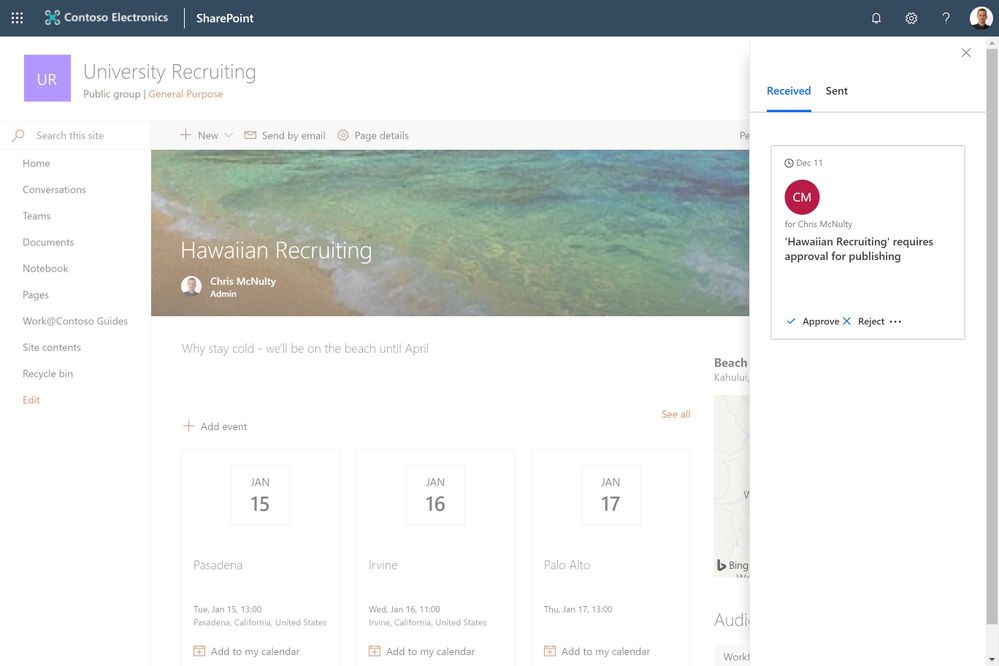
We are happy to announce the release of page management and approvals, as we disclosed at Ignite 2018.
SharePoint page authoring makes it simple to craft beautiful immersive experiences that integrate applications, data, text, media and more. Pages are also essential for team news, which let you share impactful updates with an automated distribution engine that reaches portals, mobile, email, Microsoft Teams and more.
News pages can be highly visible, since they are automatically aggregated in hub sites, mobile apps and the SharePoint home page. Some organizations want to standardize page templates and layouts, and institute a review process to assure that all updates are approved.
Now you can setup approval processes, based on Microsoft Flow, to ensure page review if required. Inside the pages library, you can use the Flow pulldown menu option to create an approval process with just a few mouse clicks.
You can use the immersive demo link below to expereince page management and approvals.
Tech Community Demos
https://demobuilderwebcpptxz.blob.core.windows.net/page-approvals/startdemo.html
Configuring approvals is optional – you can continue to publish pages without an approval step based on your governance and publication style. Page approvals will begin rolling out to targeted release in mid-December 2018.
Am a keen follower of Microsoft's SharePoint Blog and proud to provide this direct from the Microsoft Tech Community:
We are happy to announce the release of page management and approvals, as we disclosed at Ignite 2018.
SharePoint page authoring makes it simple to craft beautiful immersive experiences that integrate applications, data, text, media and more. Pages are also essential for team news, which let you share impactful updates with an automated distribution engine that reaches portals, mobile, email, Microsoft Teams and more.
News pages can be highly visible, since they are automatically aggregated in hub sites, mobile apps and the SharePoint home page. Some organizations want to standardize page templates and layouts, and institute a review process to assure that all updates are approved.
Now you can setup approval processes, based on Microsoft Flow, to ensure page review if required. Inside the pages library, you can use the Flow pulldown menu option to create an approval process with just a few mouse clicks.
You can use the immersive demo link below to expereince page management and approvals.
Tech Community Demos
https://demobuilderwebcpptxz.blob.core.windows.net/page-approvals/startdemo.html
Configuring approvals is optional – you can continue to publish pages without an approval step based on your governance and publication style. Page approvals will begin rolling out to targeted release in mid-December 2018.
The above is kindly provided by the Microsoft Tech Community!
Personal productivity is essential to teamwork. SharePoint lists and libraries have long allowed to you defined custom metadata columns to track dates. As announced at Ignite 2018, we are releasing a new capability that lets you set reminders for any of these dates. You’ll be able to receive a personal email alert ‘x’ days in advance of a date on any document or item in SharePoint.
Create a reminder flow
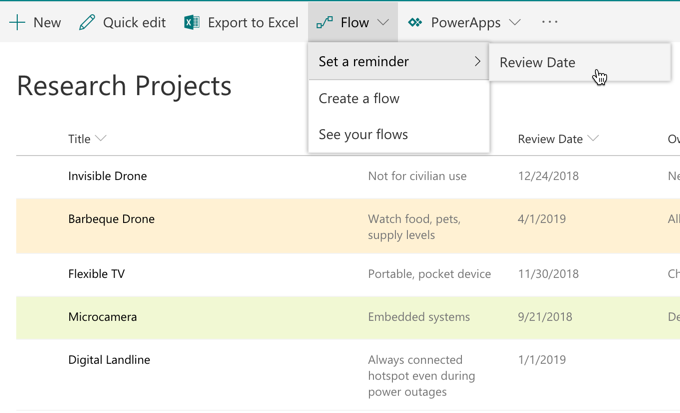
To create the reminder flow, your list or library should have at least one date/time column in the current view. You’ll then able to create a reminder by selecting the Flow->Set a reminder menu.
You can enter the number of days in advance for the reminder, based on the selected date column.
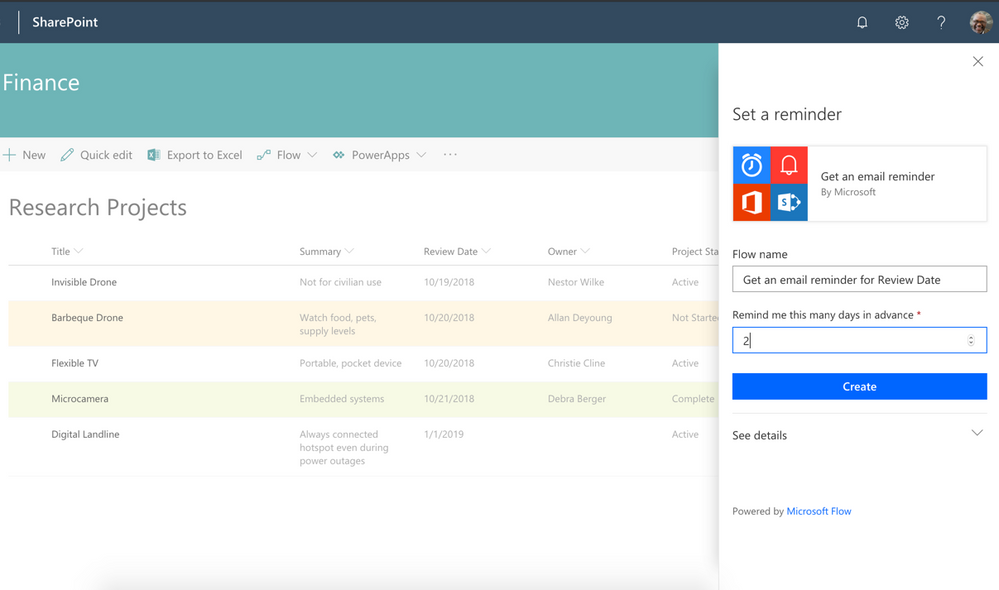
Based on your selection, you’ll get an email from Microsoft Flow for any items or documents ‘x’ days in advance of the selected data column value.
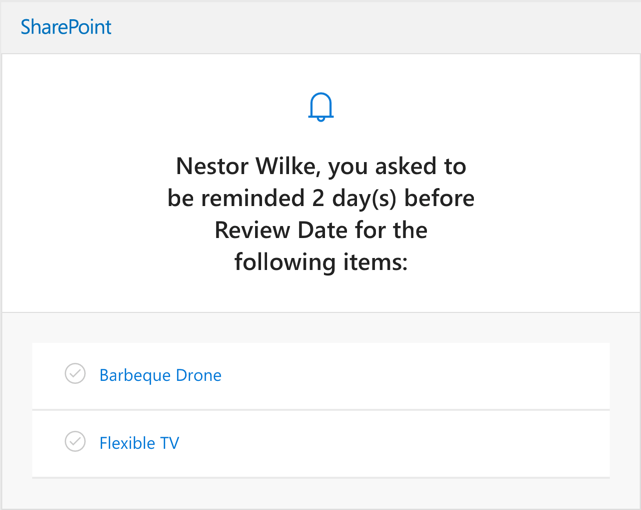
Once the flow is created, it can be edited from the Microsoft Flow website. You can modify “days in advance”, or add additional actions.
This feature is slated to begin rollout to Targeted Release on or about December 18, 2018. If you’d like to try it in advance, you can see reminders in action on the Business Apps Resource Center.
As always, we are listening for feedback. Please let us know if you have any questions or suggestions. Thanks.
Am a keen follower of Microsoft's SharePoint Blog and proud to provide this direct from the Microsoft Tech Community:
Personal productivity is essential to teamwork. SharePoint lists and libraries have long allowed to you defined custom metadata columns to track dates. As announced at Ignite 2018, we are releasing a new capability that lets you set reminders for any of these dates. You’ll be able to receive a personal email alert ‘x’ days in advance of a date on any document or item in SharePoint.
Create a reminder flow
To create the reminder flow, your list or library should have at least one date/time column in the current view. You’ll then able to create a reminder by selecting the Flow->Set a reminder menu.
You can enter the number of days in advance for the reminder, based on the selected date column.
Based on your selection, you’ll get an email from Microsoft Flow for any items or documents ‘x’ days in advance of the selected data column value.
Once the flow is created, it can be edited from the Microsoft Flow website. You can modify “days in advance”, or add additional actions.
This feature is slated to begin rollout to Targeted Release on or about December 18, 2018. If you’d like to try it in advance, you can see reminders in action on the Business Apps Resource Center.
As always, we are listening for feedback. Please let us know if you have any questions or suggestions. Thanks.
The above is kindly provided by the Microsoft Tech Community!

Latest monthly summary of SharePoint Development guidance for SharePoint Online and on-premises now available from the Office 365 Dev Blog. Check the latest news, samples and other guidance from this summary.
Am a keen follower of Microsoft's SharePoint Blog and proud to provide this direct from the Microsoft Tech Community:
Latest monthly summary of SharePoint Development guidance for SharePoint Online and on-premises now available from the Office 365 Dev Blog. Check the latest news, samples and other guidance from this summary.
The above is kindly provided by the Microsoft Tech Community!
We’re thrilled to announce that all customers using Multi-Geo Capabilities in Office 365 will soon be able choose India as a satellite geo-location to store their users’ Exchange Online Mailboxes and OneDrive for Business files at-rest, and address their global data residency needs. Once SharePoint Multi-Geo is generally available, it will also include the India geo.
We’re in the process of rolling out the India geo to all Multi-Geo enabled Office 365 tenants. In the next few weeks, Multi-Geo customers will get a Message center notification in Office 365 indicating that the India geo available. After that, simply set the “PDL” to “IND” to trigger the move of mailboxes and OneDrive files to the India geo. Read more on configuring Multi-Geo at aka.ms/ExchangeMultiGeo and aka.ms/OneDriveMultiGeo.
This means Multi-Geo is available in 10 geos across Microsoft’s massive global data center footprint. Learn more about Multi-Geo at aka.ms/GoMultiGeo
The Office Online team is pleased to release our latest update to Office Online Server (OOS). OOS empowers organizations to view, edit, and create documents in the browser with Word, PowerPoint, Excel, and OneNote from their own datacenter.
Please verify that you have the latest version of the OOS release to ensure the best experience.
The November 2018 update of OOS includes the following improvements:
- Additional formatting options in PowerPoint Online such as paragraph customization (indentation, line spacing, spacing), custom slide sizes, enhanced table functionality, increased list options
- New PowerPoint Online slide themes
- Pivot tables, conditional formatting for Excel Online
- Faster boot and editing performance in Word, PowerPoint and Excel Online
- Accessibility & usability improvements across all applications
- ULS logging formatting changes (details)
- Many more improvements + bug fixes across all applications
How do I get OOS/download the update?
We encourage OOS customers to download the November 2018 release, as only the latest version will be supported with bug fixes and security patches available from the Microsoft Updates Download Center. You must uninstall the previous version of OOS to install this release.
Eligible customers can download the latest update of OOS through the Volume License Servicing Center (under the product pages for Office Professional Plus or Office Standard). Customers that have purchased Office 365 Pro Plus subscriptions or Software Assurance (SA) with an Office licensing suite will have OOS rights for document creation, editing, and save functionality. Other volume licensing customers, except those who have purchased Open licenses, can download OOS with view-only functionality. For more information on licensing requirements, please refer to our product terms.
For customers whose licenses qualify for OOS, but cannot obtain OOS through the Volume Licensing Services Center, the following actions are possible:
- Direct customers can submit a request from their Office 365 admin center or contact support.
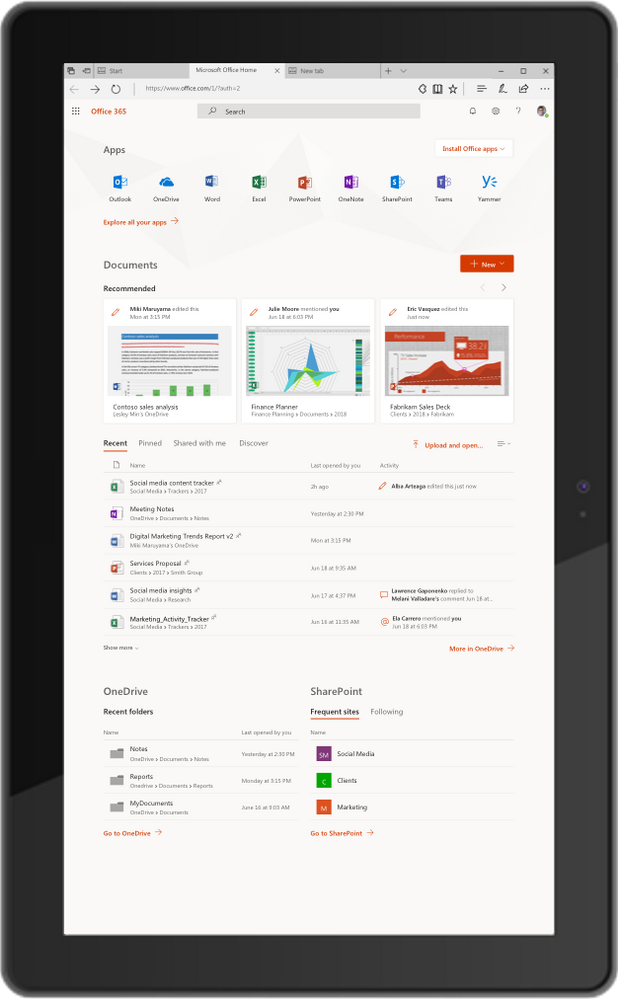
Modern workers are always looking for ways to be more productive, but in today’s always connected world filled with infinite distractions, it is hard to stay focused, find what you are looking for and determine where to get started doing your most important work. Office.com pulls your most relevant apps, documents and places where you and your coworkers are working—all in one place. We are pleased to update you on the new capabilities that are coming to Office 365 in the web.
Get started with Office.com
We reimagined Office.com last year as the best place to get started, get back to your content and get the most of your Office 365 subscription. Giving you fast access to what’s most important to you, we have rolled out a Recommended Section that helps you discover relevant documents, like the ones your colleagues recently edited or added. We have also introduced new start pages for Word, Excel, PowerPoint and Sway that give you access to recommended and recent files filtered to the specific application you are working in.
Bringing Microsoft 365 Search, and improved help to your fingertips
Microsoft is introducing new tools for collaborating and getting back to work that are available across all of Office 365 in the web in a single click—streamlining the ability for users to work more efficiently by reducing context switching.
Microsoft 365 Search
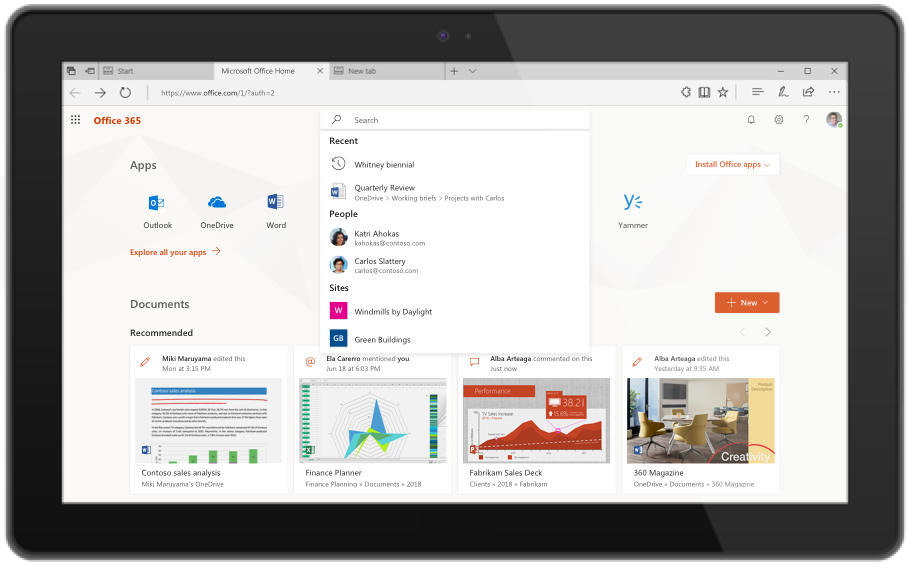
You no longer have to search different applications separately. With Microsoft 365 Search within Office 365 in the web, you can find the documents, people, sites, and apps you need—even third-party apps your company uses. Microsoft 365 Search is available on www.office.com now, and It will be elevated to the top of the page by the end of the year. In the coming months, it will be rolling out to other Office 365 applications. Learn more about it here.
Improved Help and Support
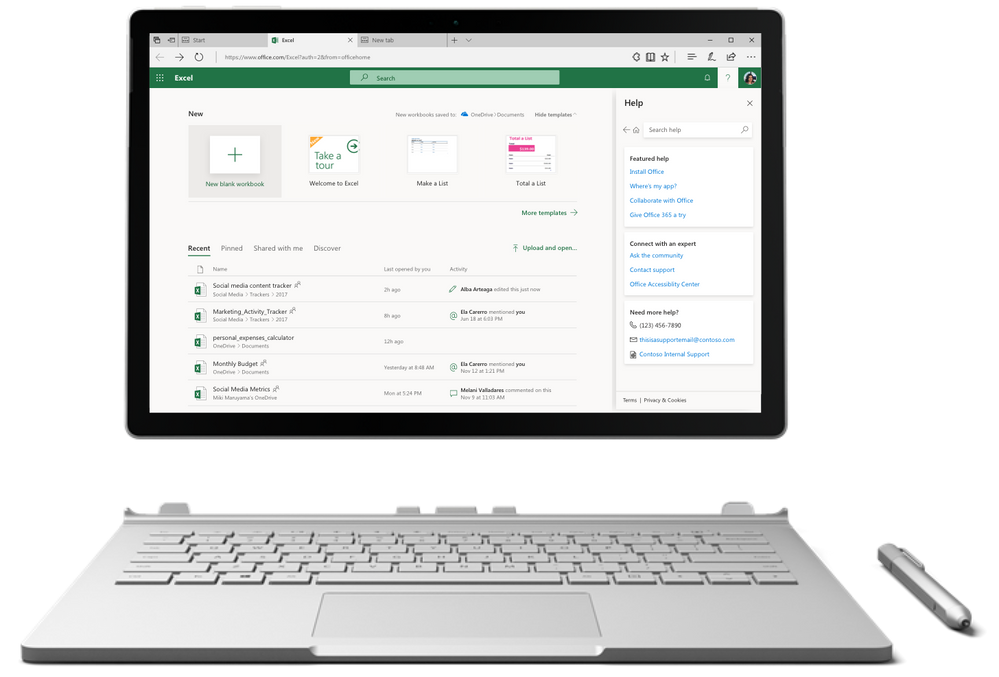
The services that power help and support in Office desktop clients, are now extended to the web. The new and improved help and support pane gives you tips, access to the latest support articles, and provides contextual help on the top issues for the app you’re using. You can also customize the pane with your company’s helpdesk information. The new experience is rolling out on www.office.com over the next month and will roll out across all Office 365 in the web over the coming months.
Visit www.office.com and try out the new experiences. Stay up to date on the latest news and features for Microsoft 365 and join the conversation in the Microsoft 365 Tech Communities
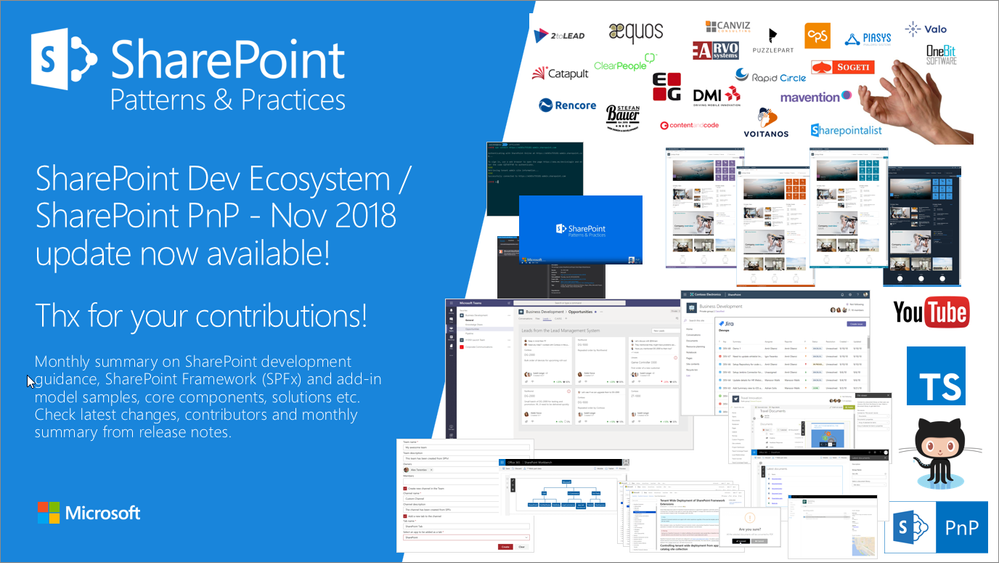
Latest monthly summary of SharePoint Development guidance for SharePoint Online and on-premises now available from the Office 365 Dev Blog. Check the latest news, samples and other guidance from this summary.